- Start with Codex CLI + GPT-5.2 (high/xhigh). This is the current frontier. Use other stacks when you have a clear reason.
- Make "done" measurable. Write acceptance criteria the agent can prove with tools, like tests, builds, lint, or queries. The build-verify loop is non-negotiable.
- Keep durable memory outside the chat.
plan.mdis the blueprint.checklist.yamlis current status.run-log.mdis the audit trail. Your agent should refer to them across compaction and restarts. - Observability is key. Durable memory plus audit logs are for async observability and post-mortems; Codex reasoning traces and thinking blocks are real-time observability.
- Steer early. Drift compounds. Use your observability system to steer the agent. A short correction in the first 10 minutes beats an hour of cleanup.
- Keep the verification loop cheap. Fast tests often, full suite at milestones, and CI always running in the background, continuously polled by the agent.
- Checkpoint constantly. Small commits, reversible steps, and separate checkouts for parallel work.
- Review by risk. Agent-first review, then human review on high blast radius areas.
- Self-evolve after every run. Extract skills, agent guideline updates (
AGENTS.md), and repo evals fromrun-log.md.
Introduction
Who this is for
- Founders and execs who want more engineering throughput or run their own complex tasks and experimentation in async
- Engineers and tech leads running large refactors, migrations, and platform work
- Platform teams hardening CI, tests, and developer experience
How to use this playbook
- Skim Stack and setup, Operating system, and Cost management so you pick a stack and a workflow.
- Copy the durable memory system templates into your repo.
- Run one small long job first, in a safe environment, with a strict verification loop.
- Only then scale to overnight runs and parallel worktrees.
- After you ship, extract follow-ups from
run-log.mdinto skills, repo evals, and agent guidelines (AGENTS.md).
What is a long-running agent?
Long-running agents are coding agents that can run for hours or days with minimal intervention. You hand them a scoped job, a verification loop, and a memory system. They keep working, checkpointing, and producing evidence until your task is verifiably complete.
Cursor has written about how their agents work continuously over a week on a single codebase. Examples include a web browser built from scratch with 1M+ lines across about 1,000 files, and a Java LSP with 2.5M+ lines across about 10,000 files. They also report peaks around 10M tool calls in a week, with bursts around 1,000 commits per hour. Source: Scaling long-running autonomous coding.
This playbook is an operating model for how I achieved similar results. It is opinionated. It assumes you want throughput and you still want to ship safely: green CI, reviewable diffs, rollback paths, and no surprises in production.
In concrete terms, a long-running agent:
- Plans and executes long, complex multi-step work
- Keeps score with a build-verify loop (tests, builds, linters, benchmarks, browser flows, queries)
- Self-heals when it hits failure (flakes, timeouts, tool errors, missing context)
- Maintains state across a long session (compaction, resume, fork)
- Leaves a paper trail you can audit (checkpoints, logs, evidence)
- Self-evolves by extracting skills, agent guidelines, and evals from past runs
Where long-running agents shine
Great fits:
- Large refactors: API changes, renames, file moves, staged migrations
- Migrations: framework upgrades, dependency bumps, schema changes and backfills
- Reliability work: harden CI, shrink flakes, add checks and policies
- Performance work: benchmarks, profiling loops, regressions, perf budgets
- Test work: build suites, fix flakes, raise coverage where it matters
- Security hygiene: dependency audits, secret scanning, permissions cleanup
- Data analysis and reporting: repeated queries, synthesis, polished writeups
- Feature work: wide-but-shallow features with crisp specs and verifiable acceptance criteria, usually behind a flag
- Internal tools: dashboards, admin panels, backoffice workflows with clear "done"
- Incident work: log triage, repros, mitigations, postmortems and follow-ups
Where they are a bad fit
Prefer interactive work when:
- The problem is ill-defined and you need rapid back-and-forth
- The best solution requires taste and fast iteration (UX polish, naming, API design)
- The acceptance criteria is subjective, not measurable
- The blast radius is high and the rollback story is weak
- The work requires frequent human decisions (product tradeoffs, stakeholder input)
Stack and setup
Models
What you want in a long-running model
Look for:
- Strong tool use, especially shell output parsing
- Endurance on long, boring sequences (keeps going, refusal to give up)
- Good recovery after failures and partial progress
- Refactor discipline (does not randomly rewrite style, can be guided with skills/AGENTS.md)
- Low hallucination rate around file paths, APIs, tool and CLI usage
My point-in-time take (Feb 2026)
If you want one default: Codex CLI + GPT-5.2 (high or xhigh).
For long-running agent work, this is the frontier stack right now. It runs tool loops for hours, compaction stays coherent, and it is easy to steer in real time.
The big advantage is in-flight visibility. Codex shows the reasoning trace in real-time so you can redirect early. In my experience this saves a ton of time compared to harnesses where you mostly see output after a long step finishes.
Codex's reasoning trace (thinking blocks) pairs strongly with its steering feature. You can see where the agent is headed mid-flight and cut off bad paths early by sending messages in real-time without interrupting its agent loop.
Use your durable memory system for async observability. It is what you read in the morning, after compaction, and after restarts. Treat it as the system of record for decisions and evidence, even if you have thinking blocks.
Claude Code does not expose internal reasoning the same way today. You can still run long jobs, but you should compensate with shorter execution steps, more checkpoints, and stricter logging.
I use other harnesses for three reasons:
- I want a different model
- I am doing fast interactive work
- I am optimizing for cost on execution runs
Claude notes (Opus 4.6)
Opus 4.6 is strong and I still use it for interactive work.
For long-running background runs, it is not my default. Cursor put it bluntly: "Opus 4.5 tends to stop earlier and take shortcuts when convenient." Source: Scaling long-running autonomous coding.
While Anthropic's Opus 4.6 release claims better performance at long-running tasks, anecdotally it still gives up more easily compared to GPT-5.2/Codex-5.3 models. Apart from the training, I also suspect its partly because OpenAI allocates a very generous thinking budget on high and xhigh reasoning levels in Codex.
If you are in a Claude-first stack, you can still run long jobs. You will usually want a stronger harness loop (hooks and a "Ralph loop"), plus the same fundamentals in this playbook. More on that in Harnesses.
Reasoning effort (thinking levels)
Most serious harnesses expose a reasoning effort setting like low, medium, high, xhigh.
Practical rule:
- Plan with
highorxhigh. - Execute with
mediumor coding-specific models (e.ggpt-5.3-codex-xhigh). - If execution feels slow, switch to a faster model before you drop effort.
Open-weight models as execution engines
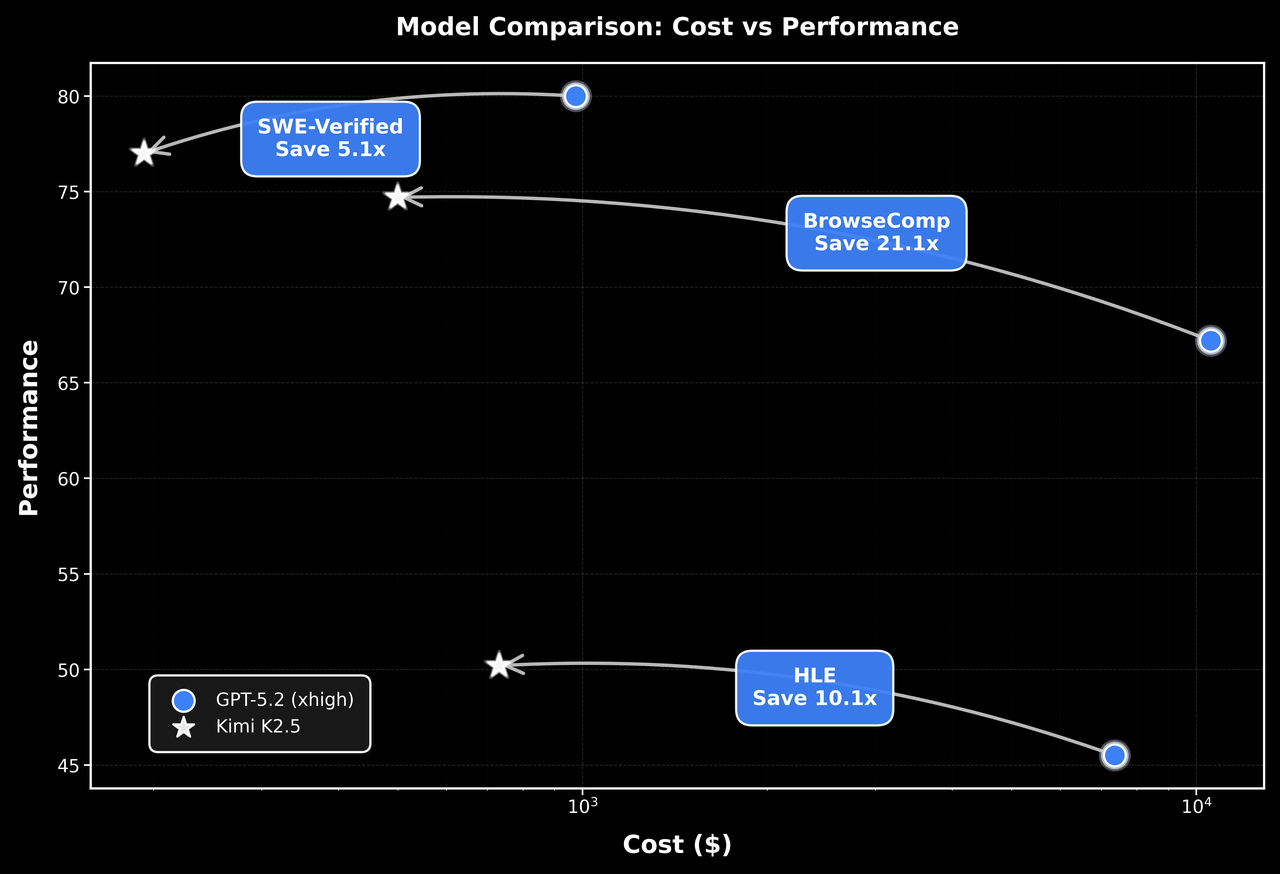
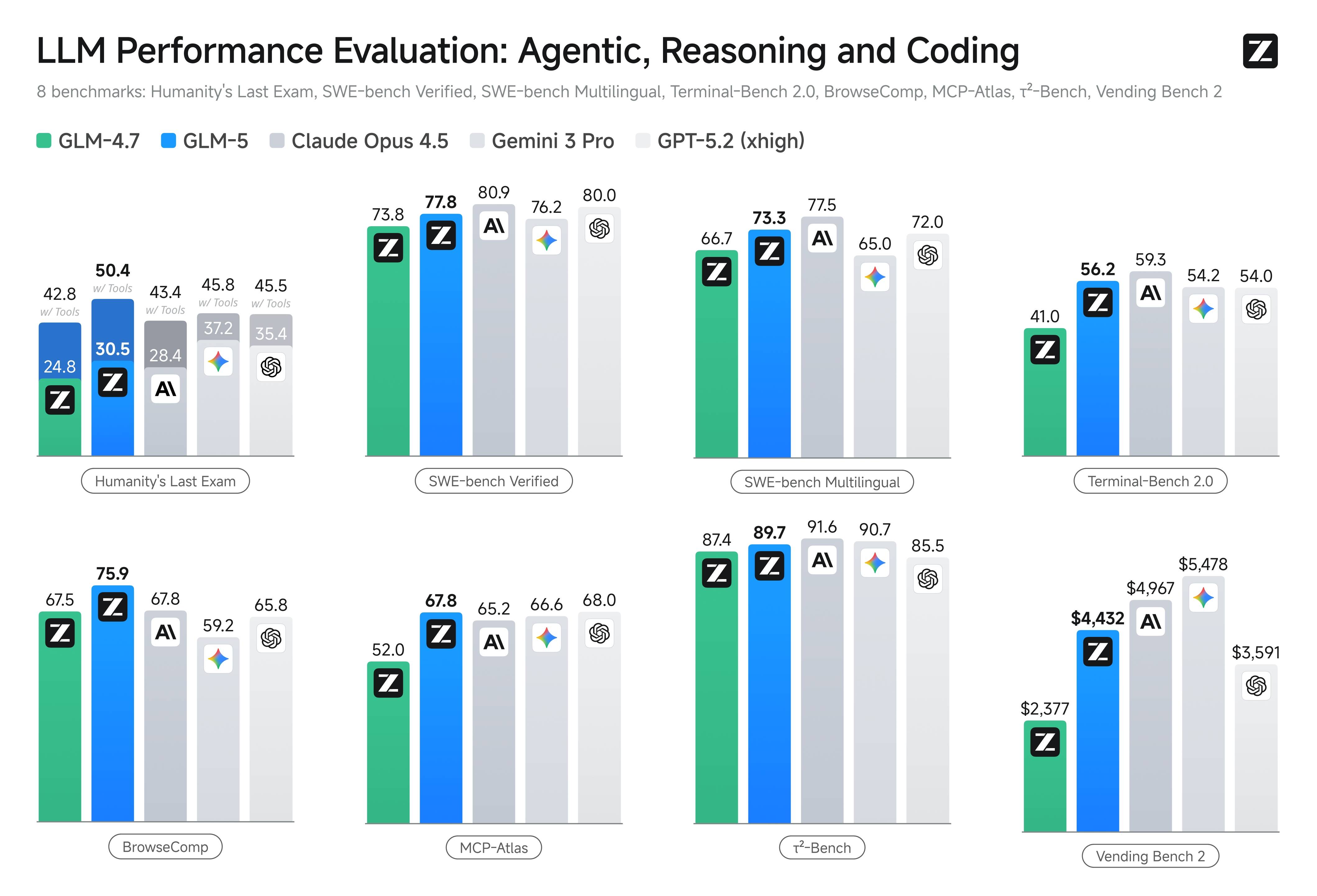
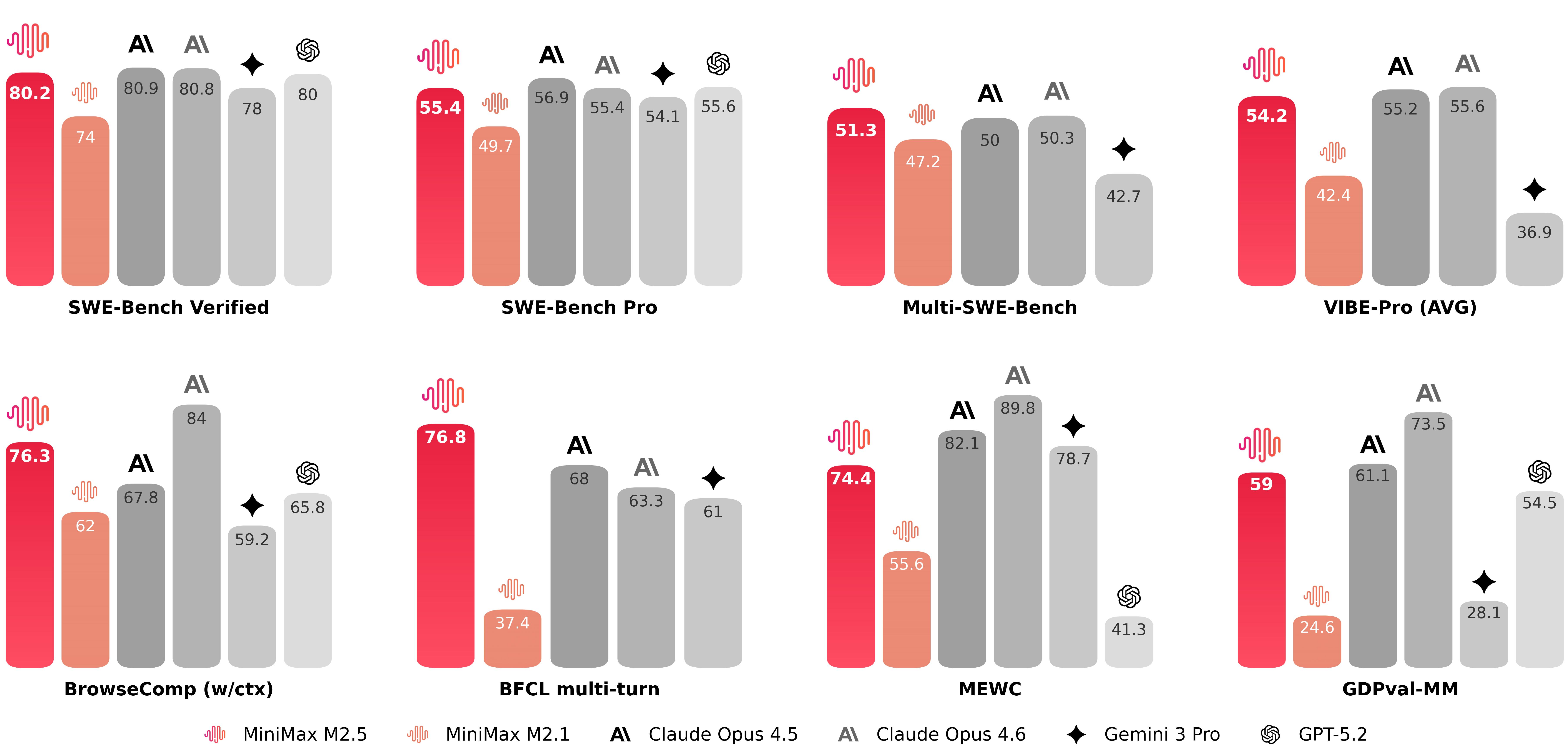
Open-weight models are now good enough to matter. With a strict verification loop, they can do a lot of the execution work at a fraction of the cost.
A couple outside takes match what I see:
- "There are a wide range of "open weights" ... and they've been getting really good over the past six months." (Simon Willison)
- "Delivering frontier-class performance at significantly lower inference costs." (AWS)
How I use them:
- Plan and review with a frontier model at higher effort.
- Execute with an open-weight or cheaper model once the plan and test loop are locked.
- Keep steps small. Verify constantly. Commit often.
Two choices matter here:
- Harness (orchestrator): how you run the loop (Codex, Cursor, Claude Code, OpenCode, Pi).
- Provider (routing): where the model comes from and how you pay (direct API, OpenRouter, Baseten, Fireworks, OpenCode Zen).
Pick the harness for workflow. Pick the provider for model access, pricing, caching, and compliance.
Harnesses (agent runners)
A harness is the software around the model. It is the difference between "chat with a model" and "operate an agent".
What to look for
- Plan mode and execute mode
- Session persistence (resume, fork, export)
- Compaction that stays coherent after hours
- Tool permissions that scale: approvals, allowlists, repo policies like
AGENTS.md - Background terminals for long commands (tests, builds, CI, migrations, browser runs)
- Structured memory support (
plan.md,checklist.yaml,run-log.md) - Skills for reusable workflows (see Skills, MCP, and CLI tools)
- Subagents for specialists (explore, execute, review)
- Good ergonomics for steering and review
Codex (CLI)
This is my default harness for long-running coding work.
Why it is best-in-class for long runs:
- Tool loops are the default. It can run tests, builds, and scripts for hours and keep the run moving.
- Sessions live on disk. Resume and fork are cheap, so you can treat runs like workstreams.
- Compaction stays usable. With good memory files, I rarely worry about context rot.
- Thinking blocks plus tool traces make steering effective. You can correct intent early.
- Permission control is clean, including
--yolowhen you want full access on a disposable machine. - Built-in review workflows (
/review)
Two features I use constantly:
- Plan mode: keep it in planning until you approve the approach.
- Steering: send a correction mid-run so the next cycle course-corrects fast.
Practical tips:
- Start in plan mode. Switch to execute after
plan.mdandchecklist.yamlare crisp. - Turn on steering for long runs.
- Use
--yoloonly when the environment is isolated and disposable.
Claude Code
Claude Code is one of the most feature-rich harnesses today.
If you want Claude Code to behave like a long-running runner, you need a "keep going even if you want to stop" loop for yoru agent:
- Hooks: scripts that run on lifecycle events
- Stop hooks: hooks that trigger when the agent is about to stop
- Ralph loop: a stop-hook pattern that continues or restarts the run
Anthropic documents hooks and the Ralph Wiggum plugin. See Claude Code hooks and Claude Code plugins. Many also roll their own bash loop so they can restart fresh sessions with next context when long runs start to experience context rot.
If you are running Opus for hours, external memory is the crux. Treat plan.md, checklist.yaml, and run-log.md as mandatory, and design your loop to reread them after compaction and restarts.
Cursor background agents
Cursor has some of the most concrete public writing on long-running agents at scale. Read Scaling long-running autonomous coding even if you do not use Cursor.
The operating model is portable: treat agent runs like running software. Monitor them, recover from errors, and expect loops that can span a full day.
OpenCode
OpenCode is a model-agnostic harness worth understanding.
It has:
- A great terminal UI
- Multiple providers and models under one UX
- Granular permissions (ask, allow, deny) by tool
- Plugins and hooks (including compaction hooks)
- Subagents you can invoke for focused work
- A server mode (
opencode serve) with an API for automation
Docs: OpenCode.
Pi
Pi is a small, extensible terminal harness. It is a good fit when you want a model-agnostic core that you can extend, and you want to bake in your own workflows and memory system.
Why it matters for long-running work:
- Strong session system (resume, branching session tree)
- Steering and follow-up messages as first-class concepts
- Extensions that let the agent extend the harness itself (tools, providers, UI)
Pi is also used as an SDK in projects like OpenClaw, which is a good testament to its extensibility. See Pi and OpenClaw.
Tracking the frontier
This space moves fast. The meta-skill is switching stacks without chaos.
My loop:
- Keep a default stack and document it (model, harness, effort levels, memory files, safety mode).
- Follow release notes, pricing pages, and technique writeups. Frontier labs publish some of the best material on how to run agents well. Start with the OpenAI developer blog.
- OpenAI (Codex, models, pricing)
- Anthropic (Claude Code, models, pricing)
- Cursor (Anysphere)
- Moonshot (Kimi), Z.ai (GLM), MiniMax
- Follow builders who ship in public and post real runs and failure modes. Most real-time discussion is on X.
- Keep a small eval suite in your repo and rerun it when a new model drops. Start by turning 10 to 20 real repo tasks into evals. See Evals.
- When you are tempted to switch stacks, do one eval task and one "feel" run first.
Evals (measure your reality)
An eval is a small, repeatable task with a known "done" state. It measures the stuff you care about: repo conventions, tool access, flaky tests, migrations, CI, and constraints.
Benchmarks are useful. They are not enough. Your evals are what you should optimize for.
How to build them:
- Start with 10 to 20 real tasks from your repo.
- Mine
run-log.mdfor failures and manual interventions, then turn those into eval tasks. - After each long run, ask an agent to read
run-log.mdand propose new evals. - Eventually turn it into a skill or encode into AGENT.md so the agent always does this
- Keep comparisons honest. Hold the harness and workflow fixed. Change one variable at a time.
Cost management
Long-running agents can burn a lot of tokens. Set a budget. Pick a routing strategy. Then run your verification loop often so you do not pay to learn the same thing twice.
Pick a cost model that matches the work
- Flat-rate subscriptions can be the best deal for long runs, as long as you stay inside the limits.
- Usage-based APIs are great when you need control, custom routing, or you want to mix models.
- Open-weight models can be excellent for lower-cost execution runs, especially with strong verification loops.
ChatGPT Pro vs Claude Max
If you want to run long background agents today, ChatGPT Pro is the best subscription for it.
Price check: ChatGPT Pro is $200/month as of 2026-02-24. See ChatGPT pricing.
Two real reasons:
- The limits have been extremely generous in practice for long-running Codex work.
- The workflow is tightly integrated with the frontier OpenAI coding models.
In one refactor run that consumed 52M+ tokens (and 2B+ cached tokens), I still had about 35% of my weekly limit remaining on Pro. I was also doing other heavy Codex usage that did not appear in the token count. The limit window reset by the time the job finished, so it had no real impact on my next runs.
These plans evolve. Check the current limits before you commit to a workflow. Some people buy multiple subscriptions to increase headroom. Read the terms and use judgment.
Claude Max has strict five-hour windows and message caps. That is fine for interactive work. It becomes a bottleneck for multi-hour background runs and parallel agents. See Anthropic usage limit best practices.
Corporate reality and model routing
If you are doing this on a company codebase, a personal flat-rate plan might not be viable. Compliance, billing, and data policies usually push you toward enterprise plans or API usage.
If you are paying per token, do not run everything on the most expensive model. Route:
- Plan and review on a frontier model at high effort.
- Execute on a cheaper model once the plan and verification loop are locked.
Concrete examples:
- In OpenCode, route planning to GPT-5.2 (high/xhigh), then route execution tasks to Kimi or GLM when the steps are clear and the checks are strong.
- In Codex or Claude Code, do the planning and review with the frontier model on high reasoning levels, then execute with a smaller model/lower reasoning levels. Alternatively, ask your harness to launch an OpenCode subagent for execution runs with cheaper models.
The rule is simple: switching models should not change the verification bar. Keep the same acceptance criteria, evidence, and audit trail.
A real run (token scale)
This is what one big refactor run looked like for me:
| Metric | Tokens |
|---|---|
| Total | 52,146,126 |
| Input | 46,053,693 |
| Cached input | 2,164,821,248 |
| Output | 6,092,433 |
| Reasoning | 3,542,400 |
Cached input is the story here. That is repeated context. Prompt caching changes the economics by an order of magnitude.
What this run would cost on APIs
Assumptions:
- "Cached input" is billed as prompt cache reads (not writes).
- Some providers have separate pricing tiers for very large prompts. This estimate assumes the base tier.
- Cached token counts depend on the harness and provider. Cache hit rate is not a model property. It is an integration property.
- Some providers also bill cached input storage. If your provider does, include it in your own math.
- Some providers bill reasoning tokens as output. Confirm how your route counts them.
- Prices change often. These are point-in-time.
| Option | Input ($/1M) | Cached input ($/1M) | Output ($/1M) | Est cost (this run) | Notes | |
|---|---|---|---|---|---|---|
| ChatGPT Pro | n/a | n/a | n/a | $200.00 | Flat subscription if you stay within limits | |
| GPT-5.2 | 1.75 | 0.175 | 14.00 | $544.73 | OpenAI API pricing | |
| Claude Opus 4.6 | 5.00 | 0.50 | 25.00 | $1,464.99 | Anthropic pricing + prompt caching reads | |
| Kimi K2.5 | 0.60 | 0.10 | 3.00 | $262.39 | Moonshot pricing + context caching | |
| GLM-4.7 | 0.60 | 0.11 | 2.20 | $279.17 | Z.ai pricing (cached storage limited-time free) | |
| GLM-5 | 1.00 | 0.20 | 3.20 | $498.51 | Z.ai pricing (cached storage limited-time free) |
Pricing sources:
- OpenAI: API pricing
- Anthropic: Pricing
- Moonshot (Kimi): Model pricing
- Z.ai (GLM): Pricing
Spend tokens where they buy leverage
Good places to spend:
- Planning and design
- Writing tests and hardening verification
- Debugging failures
- Review and risk analysis
Places to be stingy:
- Repetitive mechanical edits
- Long tool output pasted into chat
- Re-running expensive steps without narrowing the problem
Safety and permissions
Long-running agents work because they can run unattended. That also means they can fail unattended.
There are two sane ways to operate.
Constrained mode (sandbox + allowlists)
Use this when the agent is running on your real machine, or it can touch anything you care about.
- Read-only or workspace-write by default
- Explicit allowlists for commands, paths, and network egress
- Approvals for destructive steps, installs, and anything outside the repo
- No secrets available by default
This mode takes setup. It reduces surprise.
Autonomy mode (free rein on a disposable machine)
If you want real autonomy, isolate first and then loosen permissions.
- Dedicated VM, container, or old laptop
- No personal data, no browser profile, no SSH keys you care about
- Low-privilege tokens scoped to dev environments
--yoloor equivalent so the agent can unblock itself without you babysitting it
If the environment is disposable, the agent can safely do open-ended work like installing CLIs, running scripts, and chasing flaky failures.
Secrets and data
Rules I follow:
- Never paste secrets into prompts. Put secrets in environment variables and have the agent read them in scripts.
- Hydrate environment variables via a secrets manager (Apple Keychain, 1Password CLI, cloud secret stores) in your shell or CI.
- Use dedicated low-privilege credentials for agent runs (service accounts, scoped tokens), especially for sensitive APIs like GitHub and Google Workspace.
- Prefer short-lived tokens and rotate them.
- Treat tool output as log data. If it might contain PII, write it to a file and keep it local.
- Add secret scanning to CI if you do not already have it.
- Be conservative with new skills, MCP servers, and dependencies. Prefer widely adopted tooling. If you install something new, skim the code first. Use an agent to help audit, then decide.
When to use --yolo
--yolo (or similar "dangerous" modes) is for environments that are already isolated.
This mode is often necessary for open-ended jobs. When an agent is stuck, it may need to install tooling, poke at the network, or run cleanup tasks without waiting for you.
Good patterns:
- Ephemeral dev environments
- Dedicated VMs
- Containers with limited mounts
- Remote sandboxes
If you go this route, treat the environment as disposable. Assume it may get corrupted.
Isolation options
If you want full autonomy without fear:
- Run agents in a fresh VM
- Use a disposable dev environment platform (for example Daytona, sprites.dev, Codespaces, or your own VM templates)
- Keep a clean separation between agent workspaces and your real machine
Operating system
Long-running agents succeed when you treat them like production systems.
Non-negotiables:
- A build-verify loop. The agent must be able to prove progress with tools.
- A durable memory system. The chat becomes unreadable after a few hours. Your memory files become your dashboard.
- Observability and audit trail.
run-log.md,checklist.yaml, CI, and in-flight visibility (tool traces, plus thinking blocks in Codex) should make it obvious what happened and what is verified. - Checkpointing. Lots of small commits and clean rollback paths.
- Steering. Short corrective instructions mid-run to prevent drift and wasted time.
- Review workflows that scale. Agent-first review, then a structured human review for high-risk areas.
- Self-evolution. Turn failures into skills, agent guidelines (
AGENTS.md), and repo-local evals.
The three-file memory system
For long runs, I keep three files at the root of the repo:
plan.mdfor the blueprint and constraintschecklist.yamlfor executable work items and acceptance criteriarun-log.mdfor an append-only ops log (decisions, evidence, failures, fixes)
These files do three jobs:
- Durable memory: they survive compaction and session forks.
- Observability: they let you understand what the agent is doing without reading a 12 hour chat log.
- Self-evolution: they turn one run into many. Mine
run-log.mdandchecklist.yamlinto skills, agent guidelines, and repo evals.
Skills, MCP, and CLI tools
Tooling is the difference between a plain-text LLM and an autonomous agent.
Skills (small, reusable playbooks)
Skills are small instruction bundles that teach your agent how to do a specific thing inside your world.
There is an emerging "Agent Skills" standard for packaging skills in a portable way. See Agent Skills.
Typical structure:
SKILL.mdwith YAML metadata (name,description)- Optional
scripts/for deterministic automation - Optional
references/for docs, schemas, and runbooks - Optional
assets/for static files
The key trick is progressive disclosure:
- Load only skill names and descriptions by default.
- Pull the full
SKILL.mdbody only when needed. - Pull references only when the skill needs them.
Good skills:
- Are short and procedural
- Include verification steps
- Bundle scripts when possible
- Reference docs instead of pasting them into prompts
Examples worth having in most repos:
- "ci-triage" (fetch failing logs, reproduce locally, bisect flake)
- "db-migration" (safe migration patterns, backfills, rollback)
- "release" (tag, build, deploy, smoke test)
- "clean-commit" (narrative rebuild)
A strong pattern:
- Do a small slice interactively.
- Turn that into a skill with a few golden examples.
- Run the long job using the skill.
If you want a good mental model for skills and progressive disclosure, read Skills and shell tips.
MCP servers (capabilities with context cost)
MCP (Model Context Protocol) is a standard way to connect agents to external tools and data sources.
Common uses:
- Deep code or library lookup (DeepWiki)
- Data access (Postgres)
- Browser automation
- Connecting external systems (Linear, Jira, feature flags, on-call tools)
High leverage examples:
- DeepWiki: an AI-powered GitHub research tool by Cognition Labs (the Devin team). Use it when you need repo-grounded answers fast without spelunking every file.
- Postgres: validate assumptions against real data. Explore distributions, design backfills, test migration safety, and generate reports. Keep it read-only unless you have strict write policies.
Tradeoff: MCP can be heavy. It can bloat the context with tool instructions and verbose outputs.
Use MCP when:
- The task needs live data or deep docs from an external system, and there is an official or well-maintained MCP server
- Outputs are structured and the agent can query again
Use CLI tools when:
- You want cheap, composable output
- You want pipes, filters, and scripts
- You want minimal context bloat
You might not need MCP
MCP is useful. It is also easy to reach for too early.
Most harnesses load tool descriptions eagerly at the start of the run so the model knows what is available. This also helps prompt caching. The context cost still counts, even when the tokens are cheap.
Two problems show up fast:
Context tax. Big tool surfaces steal working memory. For browser tooling, it is common to burn about 14k to 18k tokens just describing the toolset. That cost hits before the job starts. (What if you don't need MCP at all?)
Weak composability. A lot of composition happens through inference instead of code. Outputs flow back through the model, then you ask it to stitch the steps together. Long runs get harder to rerun, harder to audit, and harder to keep deterministic. Code and CLI workflows compose cleanly. (Tools: Code Is All You Need)
A code-first setup is boring and it works:
- Have the agent write a tiny script in the repo (API calls, pagination, scraping, queries, format conversions).
- Keep the interface small: a short README plus a couple commands. Make it a skill.
- Write artifacts to disk (JSON, CSV, screenshots, diffs). Link them from
run-log.md. - If output is wrong, have the agent evolve the script. Do not add more tools.
Use MCP when you need real system access with auth, or when the external system is the work (SaaS, tickets, CRM, on-call tooling). Keep servers minimal and outputs structured.
Cloudflare's "Code Mode" is a cool example of where this is heading: a fixed tool surface (search + execute), a typed SDK, and a sandboxed runtime. It is new, so treat it as a signal and watch the space. (Code Mode: give agents an entire API in 1,000 tokens)
Browser automation (real verification)
Browser automation is a great verification loop when:
- You do not trust the test suite yet
- The change is UI-heavy
- The bug only reproduces end-to-end
Common approaches:
- Chrome DevTools MCP
- Playwright MCP
- Playwriter (CLI-driven browser automation with a small interface)
- A tiny script toolkit in your repo (start, navigate, eval, screenshot), wrapped as a skill
Two rules:
- Keep flows short and deterministic.
- Save screenshots and logs to files, then link them in
run-log.md.
CLI tools are underrated
Once you internalize the code-first approach, CLI tools become the default tool layer.
CLI tools are perfect for long-running agents:
- Deterministic
- Parsable output
- Composable (Unix philosophy)
- Scriptable. Agents are great at writing glue code.
If a tool is well known (like gh), the agent will usually figure it out. If a tool is obscure, have the agent write a wrapper script and a short README, then turn it into a skill.
Planning
Long runs are won in the planning phase.
Start by forcing clarity
Ask the agent to ask you questions until scope is crisp:
- What is the target state?
- What does "done" mean?
- What should never change?
- What is the rollout and rollback plan?
- What are the failure modes?
Kickoff (one prompt, three files)
A long run starts the same way every time:
- Copy the templates from this playbook into your repo root:
plan.md,checklist.yaml,run-log.md. - Paste the kickoff prompt from Templates into your harness. It should fill in those files, then stop and wait for approval.
- Approve the plan and checklist.
- Execute
checklist.yamluntil the tasks reach terminal states.
One rule: do not keep a second plan in chat. The plan lives in plan.md. Execution state lives in checklist.yaml. Evidence lives in run-log.md.
Define your verification loop
Long-running agents need a self-verifying feedback loop. Pick the loop, then make it explicit in the plan.
Common loops:
- Unit and integration tests
- API tests (contract tests, smoke tests, real API calls in a sandbox)
- Typecheck and lint
- Build artifacts
- End-to-end browser flows with screenshots
- Data validations (queries, metrics checks, diffs)
If you do not have a loop, build the loop first.
Pattern: red/green TDD. A simple, agent-friendly build-verify loop is: write a test that fails (red), make it pass (green), repeat. It forces the agent to prove progress and prevents plausible-but-wrong changes.
- Red: Add or update a test that captures the next acceptance criterion. Run it and confirm it fails for the expected reason.
- Green: Make the smallest change that makes that test pass. Rerun and capture the passing output as evidence.
- Repeat: Move to the next slice. If the new test never failed, it is not testing the behavior you think it is.
Use "red/green TDD" explicitly in prompts; models understand the shorthand. Source: Simon Willison: Red-green TDD (agentic engineering patterns).
Configure skills and MCP (before refactors)
Skills (and MCP if you need data from external systems) are critical to make sure your agent has all the tools for a successful run.
Skills
- Store skills in one place and keep it consistent across repos. Commit the skill definitions. Keep secrets in env vars.
- Start with a tiny starter pack:
repo-map,ci-triage,refactor-pattern,verify,clean-commit,review. - Put the skill inventory and "when to use what" in
plan.mdso routing is deterministic. - Add a pre-flight task to
checklist.yamlthat runs the key skills once and records outputs inrun-log.md.
MCP
- Only add servers that you will actually use in this run. More tools means more surface area and more noise.
- Prefer read-only connections for data systems. Add write access only when you have strict write policies and rollback.
- Add a pre-flight task to
checklist.yamlto confirm each MCP server works, and write results torun-log.md. - When MCP output is long, write it to a file and link it. Do not flood the chat.
Golden examples (especially for refactors)
Golden examples work best when they are encoded into skills.
Workflow:
- Ask the agent to scan the repo and propose 10 to 20 candidate files that represent the diversity of patterns.
- You pick 3 to 5.
- Refactor those interactively, verify them, and lock the pattern.
- Turn the pattern into a skill and a checklist section.
Now the long-running agent can replicate the pattern safely.
A standard overnight refactor recipe
Pre-flight:
- Make sure
mainis green, or capture current failures inrun-log.md. - Create a checkout for the run (worktree or separate clone).
- Use the repo scan method to select golden examples, then implement them interactively.
- Convert the pattern into a skill and reference it from
plan.md.
Kickoff:
- Generate
checklist.yamlwith tasks that have real acceptance criteria. - Open a draft PR early and let CI run continuously.
- Start the long run with clear rules about commits, verification, and logging.
During the run:
- Check in once early to confirm it is running the build-verify loop.
- Use the harness thinking view and steer when you see drift, retries, or unsafe changes.
- Keep the agent moving forward. Do not let it fight flakes for hours.
Landing:
- Run the full verification suite from scratch.
- Run agent-first review (
/reviewin Codex or your review subagent). - Do a human review by risk in the code review tool.
Templates
Copy these into your repo. These files are the memory, observability, and self-evolution layer for long-running agents.
This section has four copy-paste blocks:
- Kickoff prompt (glue that fills the files)
plan.md(blueprint and constraints)checklist.yaml(work items and acceptance criteria)run-log.md(decisions and evidence)
The plan.md template below borrows ideas from OpenAI's ExecPlan approach for Codex. See Using PLANS.md for multi-hour problem solving.
Kickoff prompt
Paste this into your harness to start a long run. It forces the agent to fill in plan.md, checklist.yaml, and run-log.md at the repo root instead of inventing new structure.
You are going to run a long background job in this repo.

Before writing code:
1) Ask me clarifying questions until you can fill in `plan.md`, `checklist.yaml`, and `run-log.md` at the repo root. Follow the structure already in those files. Do not invent a new format.
2) Create or update those three files at the repo root.
3) Stop and wait for approval.

After I approve:
- Execute `checklist.yaml` until tasks reach terminal states.
- Treat the build-verify loop as the source of truth. Propose the fast loop and the full suite.
- Keep `checklist.yaml` updated as you work. Do not delete tasks. Append new tasks when discovered.
- Record decisions and evidence in `run-log.md` with timestamps.
- After compaction or restarts, reread `plan.md`, `checklist.yaml`, and `run-log.md` before continuing.
- Keep diffs reviewable: small commits, reversible steps, milestone checkpoints.
plan.md
# Plan: <project name>

Last updated: <YYYY-MM-DD HH:MM>

This plan is a living document. Keep it self-contained. Assume a new person, or a fresh agent session, will restart from:
- `plan.md` (this file)
- `checklist.yaml` (execution state machine + acceptance criteria)
- `run-log.md` (append-only ops log: decisions, evidence, failures, fixes)

## Purpose / Big picture

In 3 to 6 sentences:
- Why this work matters
- What changes for a user
- How to see it working

## Progress and logs

- Progress is tracked in `checklist.yaml`. Keep it updated as you go.
- Decisions, surprises, and evidence go in `run-log.md` with timestamps.

## Context and orientation

Explain the current state as if the reader knows nothing about this repo.

- System overview:
- Key files (repo-relative paths):
  - `path/to/file`: <why it matters>
- Glossary (define any non-obvious term you use):
  - <term>: <definition>

## Scope

### Goal
<1 paragraph, concrete and testable>

### Non-goals
- <bullets>

### Acceptance criteria (behavior)
- <bullets that a human can verify>

## Constraints and invariants

- Must not change:
- Safety:
- Compatibility:
- Performance:

## Plan of work (milestones)

Write this as a short narrative. For each milestone, say what exists at the end that does not exist now, and how to prove it.

1. Milestone 1: <name>
   - Outcome:
   - Proof:
2. Milestone 2: <name>
   - Outcome:
   - Proof:

## Implementation map

Describe the concrete edits you expect.

- Change:
  - File:
  - Location (function, module, class):
  - What to change:
- Add:
  - File:
  - What to add:

Keep `checklist.yaml` aligned with this plan. If you discover new required work, add tasks. Do not delete tasks.

## Verification

- Fast loop (iteration):
  - `...`
- Full suite (milestones):
  - `...`
- Expected outputs:
  - <what "green" looks like>
- Evidence to capture in `run-log.md`:
  - <commands run, links, screenshots, perf numbers, query results>

## Rollout and rollback

- Rollout steps:
- Feature flags:
- Backfills and migrations:
- Rollback plan:

## Idempotence and recovery

- What can be rerun safely:
- What can fail halfway:
- How to retry safely:
- How to clean up:

## Interfaces and dependencies

Be explicit about:
- New APIs or contracts:
- New dependencies:
- Migrations and compatibility:

## Skills and tools

- Skills to use:
  - <skill name>: <why>
- MCP servers (if any):
  - <server>: <why>

## Golden examples

- <links to commits/files that define the pattern>

## Open questions

- <questions that block execution>
checklist.yaml
Agent checklist format I use in other repos.
summary:
  last_updated: "<YYYY-MM-DD HH:MM>"
  active_task_id: ""
  status: "not_started"
  blockers: []
  next_actions: []
  verification_loop:
    fast: []
    full: []

instructions: |-
  This `checklist.yaml` is the execution plan for the repo. It is the source of truth for what "done" means.

  Agent workflow:
  - Implement tasks until they reach a terminal state: `complete`, `failed`, or `archived_as_irrelevant`.
  - Do not mark a task `complete` until every item in `acceptance_criteria` has been met and verified.
  - Verify acceptance criteria with real evidence (commands/tests run, screenshots, API calls, queries).
  - Record assumptions, decisions, and verification evidence in each task's `note`, and in `run-log.md`.
  - If a task fails after multiple approaches, set status to `failed` and summarize what was tried and why it failed.
  - Keep tasks updated as you work: `not_started` -> `in_progress` -> `complete` (or `failed` / `archived_as_irrelevant`).
  - Add new granular tasks when new required work is discovered. Do not delete tasks. Archive if irrelevant.

  Task schema:
  - `task_id`: Stable unique identifier (string).
  - `title`: Short summary (string).
  - `description`: What to build and why (string; can be multiline).
  - `acceptance_criteria`: Verifiable checklist items (list of strings).
  - `implementation_notes`: Optional tips or constraints (string; optional).
  - `status`: One of `not_started`, `in_progress`, `complete`, `failed`, `archived_as_irrelevant`.
  - `note`: Freeform working log for the agent (string). Leave empty until there is something worth recording.

guidelines:
  - "Do not change public APIs without updating callers."
  - "Do not add dependencies without justification."
  - "Prefer small, reversible steps and frequent verification."
  - "Do not commit secrets."

tasks:
  - task_id: T001
    title: "Establish baseline"
    description: "Run the fast loop and full suite on main, record failures if any."
    acceptance_criteria:
      - "Fast loop passes (or failures recorded in run-log.md)."
      - "Full suite passes (or failures recorded in run-log.md)."
    implementation_notes: ""
    status: not_started
    note: ""

  - task_id: T002
    title: "<fill in>"
    description: "<fill in>"
    acceptance_criteria:
      - "<fill in>"
    implementation_notes: ""
    status: not_started
    note: ""
run-log.md
Append-only. Timestamp everything. Tag entries so you can scan it quickly.
# Run log

## Context
- Repo:
- Branch/worktree:
- Start time:

## Events (append-only)
- <YYYY-MM-DD HH:MM> decision: ...
- <YYYY-MM-DD HH:MM> evidence: ...
- <YYYY-MM-DD HH:MM> failure: ...
- <YYYY-MM-DD HH:MM> fix: ...
- <YYYY-MM-DD HH:MM> note: ...

## Follow-ups
- Skills to extract:
- Evals to add:
- Agent guidelines to update (`AGENTS.md`):
- Docs to update:
- Tech debt spotted:Execution
Once plan.md and checklist.yaml look good, execution should feel boring.
Execution rules I use:
- Implement tasks until they reach a terminal state (
complete,failed, orarchived_as_irrelevant). - Do not mark
completeuntil acceptance criteria is met and verified. - Make reasonable assumptions when blocked, then record them in task
notefields. - If a task fails, summarize approaches tried and evidence in
run-log.mdand in the tasknote. - Capture evidence in task
notefields and inrun-log.md. - When you see a repeatable pattern, extract a skill, update agent guidelines (
AGENTS.md), and add a repo eval. - Add new tasks when new work is discovered. Do not delete tasks.
- Keep
summaryinchecklist.yamlupdated so a human can see current status in 30 seconds.
A default execution loop
This is the loop I want the agent to run for hours:
- Pick the next
not_startedtask inchecklist.yaml. - Re-read
plan.mdand the relevant code. - Make the smallest change that moves the task forward.
- Run the fastest verification that can catch the likely failure.
- Commit a checkpoint.
- Update the task
notewith what changed and what was verified. - Append any surprises, learnings, post-mortems from failures to
run-log.md. - Repeat.
Milestones:
- Run the full verification suite before marking a big task
complete. - Keep a draft PR open so CI runs continuously.
Compaction
Every long run eventually hits the context window.
Harnesses handle this with compaction: they summarize history, prune tool output, and keep going. Done well, it feels invisible. Done poorly, the agent forgets constraints and starts making reasonable, wrong decisions.
How to make compaction a non-issue:
- Put critical decisions in
plan.md. - Put current truth in
checklist.yaml(status, notes, acceptance criteria). - Put surprises and evidence in
run-log.md. - Tell the agent to reread these files after compaction and at the start of each new "shift".
- Prefer writing long tool output to files over pasting into chat.
If a run goes sideways, do not salvage it for hours. Fork the session and restart from a clean checkpoint.
Steering
Steering is how you correct the agent mid-run so the next cycle adapts fast.
It works best when you have observability:
- thinking blocks/reasoning traces for real-time observability
checklist.yamltells you what it thinks it is doing right now.run-log.mdtells you what went wrong and what it learned.- The harness thinking view (for example, Codex CLI) makes steering faster.
My cadence:
- Check in a few minutes after the run starts and intermittently throughout the day.
- Check when it hits failures and recovers.
- Use hooks and skills to notify you.
- Check before you go offline for the night.
What to look for:
- Is it running the verification loop?
- Is it making reversible steps?
- Is it stuck in a loop?
- Is it changing the right files?
- Is it drifting from the plan?
When it drifts, steer quickly:
- Restate the constraint it violated.
- Offer hints or direction when useful.
- Narrow the next action to the smallest safe step.
- Tell it what evidence to produce before continuing.
High-leverage steer messages (copy/paste):
- "Stop. You are changing files outside scope. Re-read
plan.md, then continue with the next checklist task only." - "You are stuck in retries. Write a short diagnosis in
run-log.md, then change approach." - "Commit a checkpoint now. Then run the fast loop and paste only the summary."
- "Do the smallest safe step next. No refactors. One file. One test. One commit."
Review
Review is where long-running work becomes shippable.
Agent-first review
Start by asking an agent to review the diff against your acceptance criteria.
In Codex, use /review or codex review with xhigh effort. If you are not on Codex, create a review skill or a review subagent that always does the same workflow.
Example review prompt:
Review this branch against `main`.

Output:
- A risk-ranked list of files and changes (high, medium, low)
- Bugs and correctness issues
- Security issues (auth, permissions, secrets, injection risks)
- Concurrency, retries, and idempotency risks
- Consistency with repo conventions (patterns, style, architecture)
- Missing tests and weak verification
- Migration or rollback risks
- Performance and resource risks
- Suggested follow-up tasks to add to checklist.yaml

Then propose a minimal patch set to fix the top issues.
Human review by risk
After agent review, do a human pass that is biased toward high blast radius areas:
- Auth and permissions
- Money movement, ledgering paths
- Core domain business logic, reviewed by flow and invariants
- Data migrations
- Concurrency and retries
- Public APIs
Use CI as an active loop
Open a draft PR early and let CI run repeatedly while the agent continues.
A strong pattern:
- Agent runs targeted subsets locally for speed.
- CI runs the full suite in the background.
- The agent fixes failures as they appear.
This avoids a giant "everything fails at the end" moment and keeps your local machine responsive.
Land it safely
For big refactors and migrations:
- Ship behind a flag when you can.
- Prefer incremental rollouts.
- Add rollback steps to the plan.
- Prefer additive migrations first, destructive migrations later.
Self-evolution
Every long run produces edge cases. Turn them into permanent leverage.
After the PR lands:
- Ask an agent to read
run-log.mdandchecklist.yamland propose:- New skills
- Agent guideline updates (
AGENTS.md) - Repo eval tasks
- Add the best ones immediately. Treat this like adding tests after a bug.
- Keep the follow-ups list in
run-log.mdcurrent so the next run starts stronger.
Scaling up
Parallel task management
Parallel agents are a force multiplier when the work streams are independent.
Use separate checkouts, not chaos
Give each agent its own checkout.
Two common patterns:
Worktrees:
git worktree add ../repo-agent-refactor -b agent/refactor
git worktree add ../repo-agent-migration -b agent/migration
Separate clones (cleaner isolation, slower setup):
git clone "$(pwd)" ../repo-agent-review
git clone "$(pwd)" ../repo-agent-perf
Rules that keep you sane:
- One agent per checkout
- One goal per agent
- One PR per checkout
What not to parallelize
Avoid parallelizing interdependent work.
When tasks depend on each other, you get:
- Merge conflicts
- Conflicting design decisions
- Two agents fixing the same test failures in different ways
The hidden cost is lost learning. During execution, the agent learns repo quirks, test behavior, and edge cases. That context is hard to propagate across parallel runs. If the work is coupled, run it sequentially or force the learning into shared memory files.
Sequential wins here. Let one agent carry the context forward.
Checkpointing via git
Ask the agent to commit early and often.
What you get:
- A rollback path if it gets weird
- Easier review for big diffs
- A commit story you can scan quickly
Skill: clean-commit (narrative rebuild)
This comes up constantly in long-running work. Agents can land the right end state with a messy branch. "Clean-commit" is the workflow I use to rebuild the same end state with a commit history you can review and ship.
If the end state is correct but the branch is a mess, rebuild it with a clean commit storyline.
Workflow:
- Validate the source branch (no uncommitted changes, up to date with
main). - Study the full diff to understand the intended end state.
- Create a new branch off
main. - Plan a commit storyline (self-contained steps, tutorial-style).
- Reimplement commit-by-commit on the clean branch.
- Verify the final end state matches the source branch and run the full checks.
Rules:
- The end state must be identical to the original branch.
- Do not include "Generated with ..." or co-author trailers in commits.
Tools that help
- try is a handy CLI for organizing experiments and creating dated worktrees.
- Install:
brew install try-cli(orgem install try-cli) - Enable shell integration:
eval "$(try init)"(put this in your.zshrc) - Create a worktree from the current repo:
try . agent-refactor
- Install:
- Conductor is a UI for coordinating parallel tasks and agent runs.
Use whatever keeps your operating surface simple.
Running this in a team
Long-running agents work best when the team agrees on a few defaults.
- Standardize the three memory files across repos (
plan.md,checklist.yaml,run-log.md). - Standardize your safety baseline (sandbox by default, "yolo" only in isolated environments).
- Build a small shared skill library for your stack (CI triage, migrations, releases, clean-commit, review).
- Treat golden examples as artifacts. Turn them into skills, not tribal knowledge.
- Make self-evolution the habit: after each run, extract skills, update agent guidelines (
AGENTS.md), and add repo evals. - Use agent-first review as policy. Humans do the final high-risk pass.
If you do not standardize, every long run becomes a bespoke ops problem.
Troubleshooting and improvement
Common failure modes (and fixes)
These are the traps that waste the most time. Read this once, then treat it as a reference.
- The agent keeps "making progress" but you cannot prove it
- You only learn it broke something at the end
- Make "done" measurable. Tests, lint, typecheck, CI, screenshots, queries.
- If the repo does not have a verification loop, build that first.
- The agent keeps retrying tests
- It takes 30 minutes to learn one thing
- Create a fast loop for iteration, then run the full suite at milestones.
- Run a targeted subset of tests using pattern matching.
- Example (Gradle):
./gradlew :app:test --tests 'com.yourco.payments.*' - Example (Gradle single test):
./gradlew :app:test --tests '*BillingServiceTest'
- Example (Gradle):
- Prefer a persistent test environment when setup time is the bottleneck.
- Long-running local DB containers
- Reused service instances in a dev namespace
- Cached build artifacts and dependencies
- Watch for disk and memory creep on long runs.
- Keep an eye on
btoporhtop - Write a small cleanup skill if your test suite drops gigabytes of artifacts (
tmp/,logs/, browser profiles, build caches) - If Docker state creeps, restart containers. Drop volumes only if you can recreate the data safely.
- Keep an eye on
- Quarantine flakes. Make them someone's problem, or the agent will burn hours.
- The agent pastes huge logs into chat
- Compaction triggers constantly and quality drops
- Write long outputs to files (
logs/,tmp/,artifacts/) and reference them. - Teach the agent to summarize, not paste.
- It forgets a constraint and starts changing forbidden areas
- It redoes work it already did
- Use
plan.md,checklist.yaml, andrun-log.md. - Make rereading those files part of the execution loop, especially after compaction.
- It keeps trying the same fix
- It bounces between two approaches
- Add a loop breaker rule: after N failed attempts, stop and change strategy.
- Force a short diagnosis before continuing.
- If your harness supports stop hooks, use them to prevent "give up" behavior.
- One PR has everything
- Review is impossible
- Commit checkpoints early and often.
- Prefer milestone commits (mechanical refactor first, behavior changes later) or stacked PRs
- If the end state is right but the commit history is messy, rebuild the branch with a clean narrative history.
Observability
Long runs fail quietly when you cannot see what is happening.
Make the run observable:
checklist.yamlis your status page. It should answer: what is active, what is next, what is blocked.run-log.mdis your audit trail. It should answer: what changed, what was verified, what went wrong, what got fixed.- CI is your external truth. It should run continuously and catch drift early.
- Your harness tool trace (and thinking blocks, if you have them) is real-time visibility. Use it to steer while the run is still in motion.
Two rules that keep it sane:
- Write evidence to disk. Link it. Do not paste it into chat.
- Timestamp decisions and surprises as they happen. If it is not logged, it did not happen.
For the post-run loop, see Self-evolution.
Conclusion
Long-running agents change the shape of engineering work. You spend less time on mechanical execution. You spend more time on direction, constraints, and review.
The dream output is a PR you can ship: green CI, a reviewable diff, and a run-log.md that explains what happened with links to evidence. Mine the run log for repeatable workflows, then turn them into skills.
You get there with boring discipline:
- Define "done" up front in
checklist.yaml, with acceptance criteria the agent can verify. - Make the build-verify loop non-negotiable. Fast loop constantly. Full suite at milestones. Keep CI running in the background, continuously polled by the agent.
- Keep durable memory outside the chat.
plan.mdis the blueprint.checklist.yamlis current status and "done".run-log.mdis decisions, evidence, and an audit trail. Your agent should refer to them across compaction and restarts. - Make the run observable. You should be able to answer "what is it doing", "what changed", and "what is verified" in 60 seconds using
checklist.yaml,run-log.md, and CI. - Commit checkpoints. Prefer reversible steps. Keep diffs reviewable.
- Pick your safety mode before you start. Use constrained allowlists on your real machine. Use full autonomy only on something isolated and disposable.
Models, pricing, and limits will keep moving. Build a repeatable system from first principles: the agent makes a change, runs tools to verify, records evidence, and repeats. Keep the run observable so you can direct it when needed. If that loop is solid, switching models is a routing decision. Your process stays the same.
A good run feels calm. The checklist stays accurate. The agent keeps producing evidence. Your interventions are short and early. Landing the PR feels routine.
Glossary
References
- Cursor: Scaling long-running autonomous coding
- Cursor: Long-running agents
- Armin Ronacher: Tools: Code Is All You Need
- Mario Zechner: What if you don't need MCP at all?
- Cloudflare: Code Mode: give agents an entire API in 1,000 tokens
- OpenAI: Skills and shell tips
- OpenAI: Codex CLI getting started
- OpenAI: Codex in ChatGPT (usage limits)
- OpenAI: API pricing
- Anthropic: Pricing
- Anthropic: Claude Opus 4.6
- Anthropic: Claude Code hooks
- Anthropic: Claude Code plugins (Ralph Wiggum)
- Anthropic: Usage limit best practices
- Moonshot (Kimi): Kimi K2.5
- Moonshot (Kimi): Model pricing
- Z.ai (GLM): LLM guide
- Z.ai (GLM): Pricing
- MiniMax: MiniMax M2.5
- DeepWiki MCP: Docs
- Agent Skills: Standard
- OpenCode: Docs
- OpenCode Zen: Docs
- Pi: Repo
- OpenClaw: Repo
- OpenRouter: Router + model catalog
- Benchmarks: SWE-bench and TerminalBench
- Chrome DevTools MCP: Repo
- Playwright MCP: Repo
- Playwriter: Repo